
We are a distributor of OTF Studio Software family.

Waveguide Technology Laboratory Co., Ltd. is a distributor commissioned by OTF Studio GmbH to sell and support the OTF Studio software family in South Korea, Taiwan, Malaysia, Singapore, Thailand, and Vietnam.
For inquiries, please contact the email address below.
Mail to : contact_information(at-mark)douhagiken.com *
*Please replace (at-mark) with @.
OTF Studio Software

“OTF Studio” is the latest high-performance optical thin film design software newly developed by OTF Studio GmbH(Germany) using the latest technology.
With overwhelming ease of use and high performance, it enables beginners to advanced users to design the optical thin film they desire. It provides high-speed and powerful functions for optical thin film optimization design, single layer film analysis, and multilayer film analysis.
◎Click here for an explanation of the Software Features
About OTF Studio GmbH
The company was founded in Germany in March 2023 by Dr. Trubetskov, a former program developer at OptiLayer.
This optical thin film design software (named OTF Studio) uses the latest software language and is an excellent piece of software that combines high speed, highly accurate convergence, and a modern interface.
Both of the founders and their families are German nationals.

Dr. Michael Trubetskov – Founder and CEO

Dr. Tatiana Amochkina, CEO
About using the Trial Version
You can use the trial version by following the steps below. The trial version available here has no functional limitations, but the usage period is limited to 60 hours. (You can also extend the trial time if necessary for considering purchasing. Please feel free to contact us.)
Steps for using Trial Ver.
(1)
Please contact us with your request for a trial of the software.
Mail to : tadashi.watanabe@douhagiken.com
(In your email, please include the name of your company or organization, your name, country and address, and a contact email address and phone number.)
We will issue your user ID required for Download and installation of the software.
(2)
Please download and install the software from the OTF Studio download page. (You will need your User ID for this.)
(3)
We will send you the necessary information for a trial with your preferred license type (or the license type we recommend). Following this information to configure the software will enable you to begin the trial. (Depending on the license type, some information exchange may be required.)
(4)
Once the necessary trial setup is complete, you can test the software without any feature limitations for a pre-set period. The trial period will be set according to your needs. A standard trial period is 30 days.
Purchase
Please send us an email to request a quotation for the product you wish to purchase.
Mail to : Mail to : contact_information(at-mark)douhagiken.com *
*Please replace (at-mark) with @.
(In your email, please include your company or organization name, your name, country, address, contact email address, and phone number. If you need to include a different address, company name, or contact name on the quotation, please state so.)
License type
There are two types of licenses: software licenses and hardware licenses. Each has its own characteristics, so you can choose the one you want.
Hardware license
(with dongle)
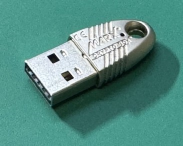
Hardware licenses are provided via a dongle that connects to a PC’s USB port. While it takes up space in the USB port and needs to be carried with the PC, the advantage is that you can use the OTF Studio software simply by plugging the dongle into your PC. It’s not dependent on a network environment, and one license can be used on multiple PCs by swapping the dongle. (However, it can only be used on one PC at a time.)
Network license
(with dongle)
Network licenses involve inserting a dongle into PCs on the same network (e.g., a company network) and supplying licenses from there. This is convenient for sharing licenses within the same organization, but requires a stable network connection.
Multiple licenses can be assigned to the same dongle. The number of PCs that can simultaneously use the OTF Studio software is limited to the number of licenses.
Cloud license
Cloud licenses are supplied from the cloud via the internet. While not suitable for sharing licenses across multiple PCs, they allow you to use OTF Studio software anywhere without needing to carry a dongle, as long as you have a stable internet connection.
This is a recently added licensing model that relies on an internet connection, but it’s very convenient if you don’t need to share licenses. (Transferring licenses between PCs is also extremely easy.)
Software license
The software license is stored within the software itself (on your PC). This means you can’t share the software with other PCs, but it’s convenient if you want to use the software on a dedicated PC or if your PC lacks USB ports. (Of course, you can also transfer licenses between PCs.)
When requesting a quotation, please let us know what type you would like to purchase.
Purchase type
There are three purchase types: ① New, ② Additional, and ③ Maintenance period renewal.
① New Purchase
(1st License)
This is the first license purchase for your company or organization. You will have a one-year free maintenance period after purchase.
② Additional Purchase
(2nd and subsequent purchases)
A discount is applied. The discount rate varies depending on the number of licenses you own and whether or not you renew your maintenance. As with the 1st license, a one-year maintenance period is included.
③ Maintenance Period Renewal
This extends the maintenance period. Once the maintenance period expires, you will no longer be able to use new versions or receive support such as answering inquiries. When the end of your maintenance period approaches, please decide whether or not you need to renew your period. Even if you do not renew your maintenance, there is no expiration date on the version you are currently using, and you can continue to use it. However, if two years pass without renewing your maintenance, you will no longer be able to renew it at the maintenance renewal price.
When requesting a quotation, please let us know what type you would like to purchase.
Note:
- Regardless of purchase type, payment terms are pay in advance.
Important points regarding discounted prices
Application of discounted prices are subject to restrictions. Please check the following notes.
Regarding maintenance period renewal
- After the maintenance period ends, a discount on maintenance renewal will be applied for two years. However, if there is a gap of one year, two years of maintenance fees will be required.
- After two years have passed since the end of the maintenance period, the discount will no longer be applied. In other words, it will be treated the same as a new purchase.
- Only during the maintenance contract period you can use new versions that are released.
Regarding additional license purchases
When purchasing additional licenses (multiple licenses), the price will be discounted according to the number of licenses owned during the maintenance contract.
- 1st license: If you are purchasing a license for the first time, there is no discount.
- 2nd license: If you are purchasing a second license, a discount will be applied. However, the maintenance contract for the 1st license must be valid.
- 3rd license: If you are purchasing a third license, a larger discount will be applied than for the second license. However, the maintenance contracts for the 1st and 2nd licenses must be valid.
- 4th license: If you are purchasing a fourth license, an even larger discount will be applied. However, even in this case, the maintenance contracts for the previous licenses (1st to 3rd licenses) must be valid.
- 5th license: If you are purchasing a fifth license, an even larger discount will be applied. Even in this case, the maintenance contracts for the previous licenses (1st to 4th licenses) must be valid.
- Licenses from the 5th license onwards have the same discount rate (price) as the 5th license.